Not every TV wall mount fits every television. VESA hole alignment is only the first check. The bracket also needs a suitable weight rating, enough clearance for ports and plugs, and a design that suits the wall and available fixing positions. An existing wall mount may still need repositioning when the television is replaced, even if the screen size stays the same.
What Does VESA Compatibility Tell You?
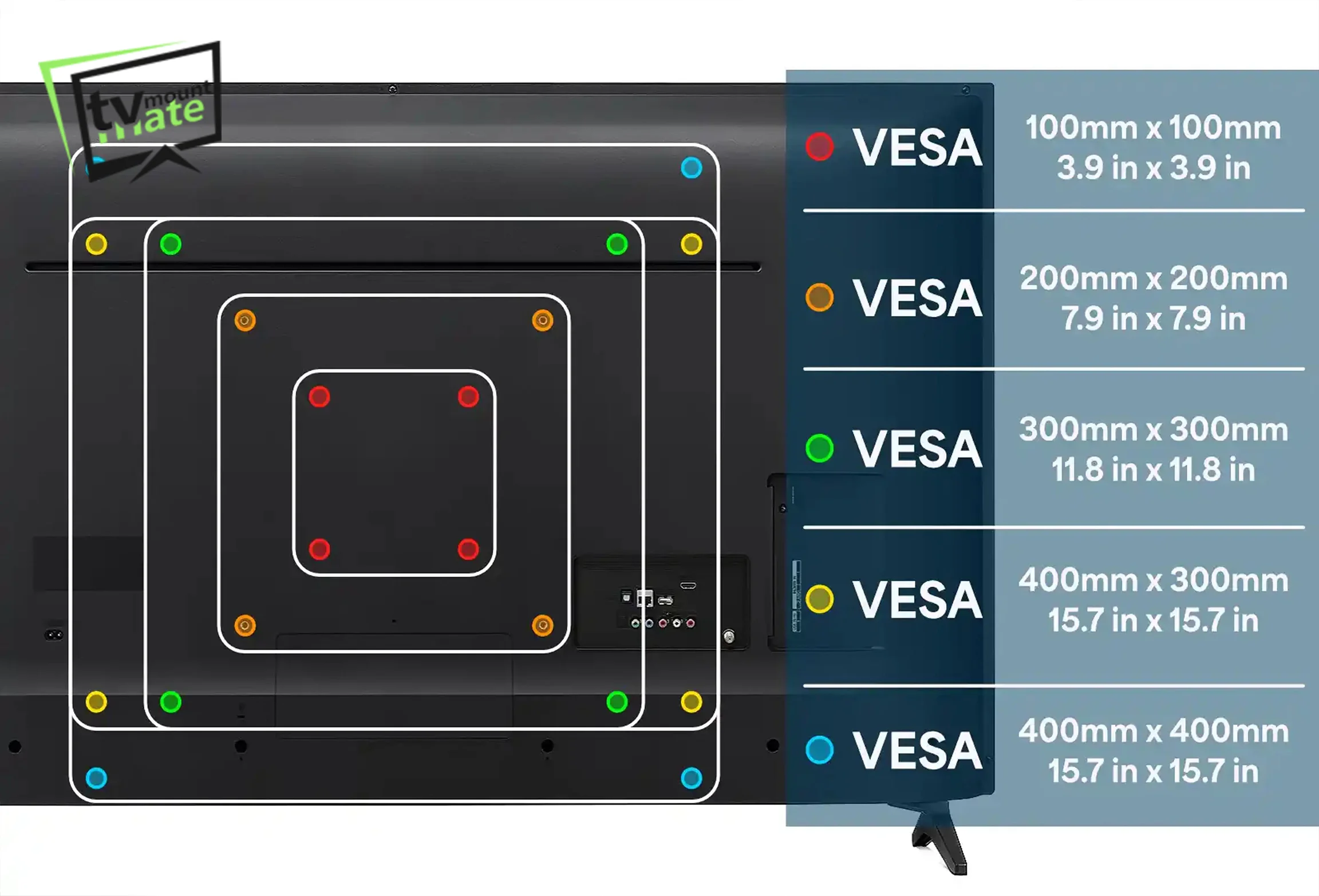
VESA stands for Video Electronics Standards Association. A VESA pattern is normally written as the horizontal distance between the mounting holes, followed by the vertical distance, both measured in millimetres. A pattern written as 400 x 400 means the holes sit 400mm apart horizontally and 400mm apart vertically.
If a bracket’s supported VESA range includes the television’s pattern, the arms will physically line up with the mounting holes on the back of the panel. That is what VESA confirms. It does not confirm that the bracket’s weight rating is high enough, that the arm reach suits the wall, that ports and plugs will stay accessible, or that the fixing positions will work on that particular wall.
Common VESA patterns include 100 x 100, 200 x 200, 300 x 200, 300 x 300, 400 x 300, 400 x 400 and 600 x 400. These are examples of patterns used across the market, not a guaranteed match for a given screen size. Two televisions of the same screen size can use different VESA patterns, sometimes from the same manufacturer.
The reliable way to check VESA size is to look up the exact television model’s manual or specification sheet, or to measure the mounting-hole spacing directly on the back of the panel.
What Must Match Between the TV and Wall Mount?
Several things need to line up before a bracket can be considered compatible, not just the VESA pattern.
| Check | Why it matters |
|---|---|
| VESA pattern | Arms need to physically reach the television's mounting holes. |
| TV weight and bracket load rating | Use the television's weight without its stand. It must not exceed the bracket manufacturer's stated maximum load. |
| Screw size and depth | Incorrect screws can damage the panel or fail to grip properly. |
| Bracket-arm position | Arm placement affects final screen height and centring. |
| Port access | Some brackets sit close enough to block HDMI or power sockets. |
| Plug and socket clearance | The bracket needs room for existing sockets and cable runs. |
| Wall-plate and fixing positions | The plate needs usable fixing points for the specific wall. |
If a replacement bracket is needed to cover any of these points, TV Mount Mate provides TV bracket supply and installation across London.
Can You Reuse an Existing Wall Mount for a New TV?
Reusing an existing wall mount for a replacement television is often possible, but the same screen size does not guarantee the same VESA pattern or the same final screen position.
On a TV swap in Royal Docks, the original television was a 65-inch Samsung from 2018. Its exact model and VESA pattern were not recorded. The replacement was a 65-inch LG C1. LG’s UK specifications for the 65-inch C1 list a 300 × 200 VESA pattern.
Although both televisions were the same screen size, the bracket-arm positions and final screen height still had to be reassessed before the replacement television was mounted.
This is the practical point for anyone considering reusing a bracket. Screen size alone says very little about compatibility. The VESA pattern, and where the arms need to sit to keep the screen centred, needs checking against the specific replacement model before assuming an existing mount will work exactly as it did before.
Model-Specific and Slim-Fit TV Mounts
Some television ranges use their own wall-mount design rather than a bracket bought separately.
Samsung uses different Slim Fit wall mounts across its television ranges. Samsung publishes model-specific compatibility lists for its Slim Fit mounts, so compatibility must be checked against the exact television model, screen size, model year and mount part number before reusing a Frame or Frame Pro bracket on a different television.
LG G Series televisions may use dedicated flush-mount options rather than a universal bracket. LG publishes different compatible mount and VESA options across G5 screen sizes and notes that supplied accessories can vary by model, package and region, and that some stand versions do not include a wall mount. The exact TV model and wall-mount part number need checking before assuming an existing bracket can be reused.
For both ranges, the most reliable approach is to confirm the part number for the specific model before buying a new television or reusing an existing mount.
Why Port and Socket Clearance Matter
A bracket can physically attach to a television and still be the wrong choice because of what sits behind or around it.
In Potters Bar, EN6, a 65-inch Sky Glass television was going onto an uneven brick feature wall. The original Sky Glass bracket did not leave suitable clearance for the existing socket and plug. A Sanus bracket was used instead, which kept the socket accessible while the television stayed level and close to the wall.
In Loughton, IG10, an 83-inch Samsung S95F was going onto a brick wall under plaster, with an existing socket sitting behind where the television would hang. TV Mount Mate supplied a One For All flat bracket, and the final choice was affected by the need for clearance around the socket and plug. A spacer was used to create the clearance needed.
In both cases, the VESA pattern was never the issue. The bracket had to be chosen, and sometimes adjusted, around what was already on the wall.
The same checks apply to slim-panel televisions such as OLED models. The VESA pattern, television weight, manufacturer screw and spacer requirements, bracket-arm position and port access all need confirming, along with careful handling of the panel itself during fitting. More examples like these are in recent work.
What Does “Universal TV Wall Mount” Mean?
“Universal” normally means the bracket is designed to support a range of VESA patterns and television sizes, not that it will suit every television and every wall.
A universal bracket can be a perfectly suitable choice for a large television, provided the relevant specifications genuinely match. Before relying on one, check the supported VESA range, the stated maximum load, the television’s weight without the stand, the required screw size and depth, whether spacers are needed, the bracket-arm position, port access, plug and socket clearance, wall-plate width and usable fixing positions, and the wall construction and fixing method.
Bracket compatibility and wall fixings are two separate checks. A bracket that is genuinely suitable for the television can still arrive with wall plugs that are not suitable for a particular wall. For plasterboard specifically, see best TV brackets for plasterboard walls.

Before Buying or Reusing a TV Wall Mount
- Measure or confirm the VESA pattern using the manual or by measuring the mounting holes
- Check the television’s weight against the bracket’s stated maximum load
- Confirm the wall type and fixing method separately from bracket compatibility, including for plasterboard TV mounting
- Check where the HDMI, power and other ports sit, and whether the bracket leaves them accessible
- If reusing an existing mount, confirm the VESA pattern and arm position still suit the replacement television
- For a Samsung Frame or LG G Series television, check the exact model and wall-mount part number before assuming a bracket can be reused
For the full pre-installation checklist covering wall type and fixings, see what to check before mounting a TV.
400+ Five-Star Google Reviews · Fully Insured up to £2 Million · 1-Year Workmanship Guarantee


Check Whether Your TV Bracket Will Fit
Send TV Mount Mate your television model number, a photograph or model number of the bracket, a photo of the wall and your postcode. We will check the setup and explain whether the bracket appears suitable before booking. You will receive a fixed quote with no deposit and payment on completion. See TV mounting prices for a general guide before you get in touch.